
Regions
Build.io runs on data centres in multiple geographic regions. Choosing the right region for your app reduces latency for your users and keeps your app close to its database and other add-ons.
Available regions
Section titled “Available regions”| Region | Location | Access |
|---|---|---|
us-east-1 | US East | Generally available |
ap-northeast-1 | Japan | Approval required |
ap-northeast-1 is a restricted region: your team needs approval before you can deploy there. Access is requested from the dashboard.
- Go to app.build.io and start creating a new app.
- Select ap-northeast-1 as the region. An Approval required dialog appears.
- Optionally add a note explaining why your team needs the region, then choose Request access.
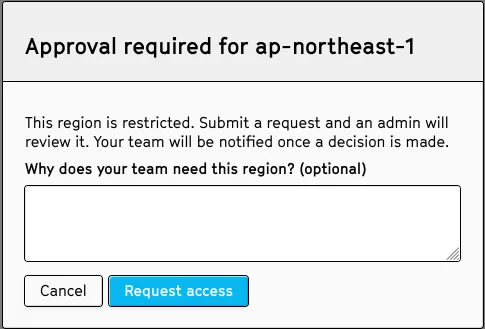
An admin reviews the request, and your team is notified once a decision is made.
Setting a region
Section titled “Setting a region”Pick a region when you create an app with the -r/--region flag. If omitted, apps default to us-east-1:
$ bld apps:create my-app -t my-team -r ap-northeast-1Namespaces also accept a region at creation time:
$ bld namespaces:create my-namespace -t my-team -r us-east-1Checking an app’s region
Section titled “Checking an app’s region”$ bld apps:info -a my-app -j | jq -r '.region'Each region also has its own SSH endpoint for bld run and bld ps:exec, shown in the same output:
$ bld apps:info -a my-app -j | jq '{region, ssh_host, ssh_port}'Choosing a region
Section titled “Choosing a region”- Pick the region closest to the majority of your users to minimize network latency.
- Keep your app and its database/add-ons in the same region—cross-region calls add latency to every request.
- The region can be changed after an app is created, but this typically involves recreating the app in the new region and migrating data, so it’s worth picking the right region up front.
Multi-region and failover
Section titled “Multi-region and failover”Build supports multi-zone deployments within a region for improved resilience. If you need an active presence in more than one region (for example, serving both US and Japan users with low latency), run separate apps per region and use your own routing layer (for example, GeoDNS or a global load balancer) to direct traffic.