
Build API Reference
The Build API provides programmatic access to your applications, configuration, and platform resources. Use it to integrate Build into your CI/CD pipelines, automate deployments, or build custom tooling.
Interactive Documentation
Section titled “Interactive Documentation”For detailed request and response schemas, try out endpoints interactively using our Swagger documentation:
https://app.build.io/api-docs/index.html
When prompted by basic HTTP authentication, the username is “build” and the password is “best”.
Base URL
Section titled “Base URL”All API requests should be made to:
Authentication
Section titled “Authentication”The API supports several authentication methods. For most use cases, a Bearer token is the simplest approach.
Include your token in the Authorization header:
Authorization: Bearer your-token-hereAPI tokens do not expire. A token stays valid until you revoke it from your account settings, so rotation is manual: generate a replacement, move anything using the old token across, then revoke it. The same tokens authenticate both the API and the bld CLI.
The API also supports OAuth 2.0 for applications that need to act on behalf of users. The authorization and token endpoints are:
Authorization: https://app.build.io/oauth/authorize
Token: https://app.build.io/oauth/token
OAuth scopes available are “read” and “write”.
OAuth client credentials are not self-serve. Registering a client is restricted to administrators, so contact support@build.io if you need one. For everything else, including CI/CD integration and custom tooling, use a Bearer token generated from your account settings.
Request and Response Format
Section titled “Request and Response Format”The API accepts and returns JSON. Include the Content-Type header when sending request bodies:
Content-Type: application/jsonMost endpoints that return a single resource respond with a JSON object. Endpoints that return multiple resources respond with a JSON array.
Errors
Section titled “Errors”When a request fails, the API returns an error response with a machine-readable code and human-readable message:
{ "code": "not_found", "message": "The requested resource was not found"}Rate Limits
Section titled “Rate Limits”The API is rate limited on a fair-use basis, applied per IP address. There is no fixed published limit, and the thresholds change over time.
A request that exceeds the limit is answered with HTTP 429. Back off before retrying, and spread bulk operations out rather than issuing them in a burst.
Resource Overview
Section titled “Resource Overview”The API is organised around the following resources:
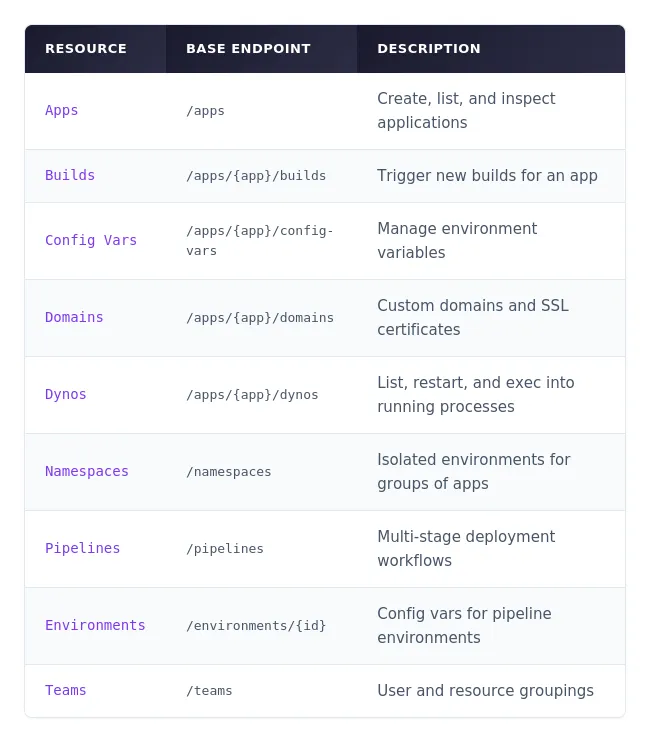
Apps are the core resource in Build. Each app represents a deployed application.
GET /apps: List all apps you have access to. Optionally filter by team using the team_id query parameter.
GET /apps/{app_id_or_name}: Retrieve details for a specific app, including its formation, buildpacks, region, and current deployment status.
POST /apps: Create a new app. Requires a name; team_id and region are optional.
Builds
Section titled “Builds”Trigger new builds for an app.
POST /apps/{app_id_or_name}/builds: Start a build. Optionally specify a branch, commitish, or description.
Config Vars
Section titled “Config Vars”Manage environment variables for your apps.
GET /apps/{app_id_or_name}/config-vars: List all config vars as key-value pairs.
PATCH /apps/{app_id_or_name}/config-vars: Set or update config vars. Send a JSON object with the keys and values you want to set.
DELETE /apps/{app_id_or_name}/config-vars/{key}: Remove a specific config var.
Domains
Section titled “Domains”Manage custom domains and SSL certificates.
GET /apps/{app_id_or_name}/domains: List all domains for an app, including the platform domain and any custom domains.
POST /apps/{app_id_or_name}/domains: Add a custom domain. Requires a hostname; cert is optional.
GET /apps/{app_id_or_name}/domains/{domain_id}: Get details for a specific domain, including its SSL status.
PATCH /apps/{app_id_or_name}/domains/{domain_id}: Update a domain’s SSL certificate.
DELETE /apps/{app_id_or_name}/domains/{domain_id}: Remove a custom domain.
DELETE /apps/{app_id_or_name}/domains: Remove all custom domains from an app.
Inspect and manage running processes.
GET /apps/{app_id_or_name}/dynos/list: List all dynos and their current status.
DELETE /apps/{app_id_or_name}/dynos: Restart all dynos for an app.
DELETE /apps/{app_id_or_name}/dynos/{dyno}: Restart a specific dyno.
POST /apps/{app_id_or_name}/dynos/{dyno}/exec: Execute a command inside a running dyno. The command must be provided as an array of strings (e.g., [“/bin/sh”, “-c”, “rails console”]).
Namespaces
Section titled “Namespaces”Namespaces provide isolated environments for groups of apps.
GET /namespaces: List all namespaces you have access to.
POST /namespaces: Create a new namespace. Requires a name; team_id, description, and region are optional.
GET /namespaces/{namespace_id_or_name}: Get details for a specific namespace.
DELETE /namespaces/{namespace_id_or_name}: Delete a namespace.
Pipelines
Section titled “Pipelines”Pipelines connect apps across development stages (review apps, CI, staging, production).
GET /pipelines: List all pipelines you have access to.
GET /pipelines/{pipeline_id_or_name}: Get details for a specific pipeline, including its environments and review app settings.
GET /pipelines/{pipeline_id_or_name}/apps: List all apps in a pipeline.
Environments
Section titled “Environments”Manage config vars for pipeline environments (such as review app defaults).
GET /environments/{id}: List config vars for an environment.
PATCH /environments/{id}: Set or update environment config vars. Set a key to null to delete it.
DELETE /environments/{id}/{key}: Remove a specific config var from an environment.
Teams group users and resources together.
GET /teams: List all teams you belong to.
GET /teams/{id}: Get details for a specific team.
Identity
Section titled “Identity”GET /me: Returns the email address of the currently authenticated user. Useful for verifying your credentials.
OIDC Login
Section titled “OIDC Login”GET /oidc-login: Returns a Kubernetes ExecCredential for authenticating with the Build cluster. Requires a region query parameter. This is primarily used by the CLI for cluster access.